
Screenshots
How to Search Screenshots by Text (or by What You Remember)
If you remember exact words that appear in a screenshot, the iPhone Photos app can often find it. If you only remember what it was about — a topic, a vibe, a detail — you need search that understands meaning. Here's how to get both.
Method 1: the built-in Photos text search
iOS indexes text inside your images (Live Text). Open Photos, tap search, and type a word you're sure appears in the screenshot — a brand name, a phrase from a tweet, an ingredient. If the screenshot has been indexed and the word is legible, it'll surface.
Where this breaks down:
- You have to remember words that are literally in the image. “That pasta recipe” won't find a screenshot that never uses the word pasta.
- New screenshots may not be indexed yet.
- Results come back as a wall of thumbnails you still have to scan.
- It can't answer a question — it can only match text.
Method 2: search by meaning with Siftlee
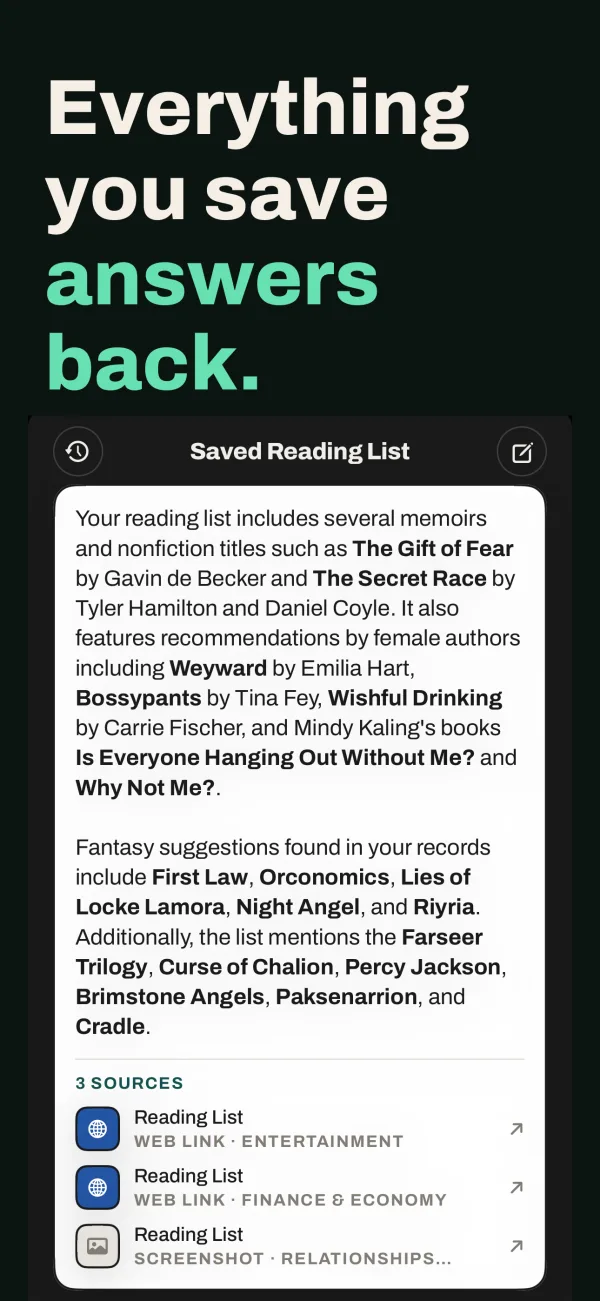
Siftlee is built for the way you actually remember things: partially. When you save a screenshot, Siftlee reads the text and works out what the screenshot means — the topic, the source, the key details. That understanding is what you search against.
- Save screenshots to Siftlee via the iOS share sheet or from your camera roll.
- Ask in plain English. “The chart about sleep and caffeine.” “The recipe with miso.” “What was the supplement in that screenshot?”
- Get an answer, not a grid. Siftlee replies with the answer and cites the exact screenshot it came from — tap through to see the original.
Which should you use?
Use Photos search when you need something from the last few days and remember exact words. Use Siftlee for anything you saved because you'd need it later — it's the difference between grepping your camera roll and asking someone who read everything you saved.
Months-later recall is the real test: by then you won't remember the words in the image, the date, or where it came from. You'll remember what it was about. That's exactly the query Siftlee is designed to answer.
Get Siftlee
Toss it in, it comes back better. Your AI second brain for iPhone — and your month, back as a magazine.